
How Online Notarization Works
How To · La Firma Notary
How your online notarization works
Three steps, one short video call. This is exactly what happens after you book: what lands in your inbox, what to have on camera, and how signing works. Walk into your session prepared, not blind.
Step 1 · Post-booking
After you book
From the moment your booking lands, everything runs through your inbox: two emails and one link.
What happens
- 1Book your session, share your details, and attach your documents right in the booking flow.
- 2A confirmation email from La Firma Notary arrives immediately, with your reference code. Keep it handy.
- 3A second email follows with your personal BlueNotary link: register and complete your ID verification before the call (step 2). Your document is already waiting in your session.
Video walkthrough coming soon
A short step-by-step video for this part is on the way. The checklist below covers everything you need for now.
Have this ready
- Your government-issued ID (see step 2)
- An email inbox and phone number you actually check
- A quiet, well-lit spot with a working camera and mic
Step 2 · Verification
Verify your ID
Florida law requires every online signer to prove their identity before the notarization. There are two routes, and both take about two minutes.
What happens
- 1US driver's license, state ID, or US passport, with US credit or residence history: the KBA quiz: five multiple-choice questions from public records. Answer at least 4 of 5 within two minutes; a second attempt is allowed.
- 2Foreign passport or no US history: biometric verification: photograph your passport, then a quick selfie with a liveness check matches your face to the document.
- 3Either way, credential analysis validates your ID's security features before you're cleared. The whole thing takes about two minutes.
Verify your ID
Have this ready
- US driver's license, state ID, US passport (book or card), or green card, or your foreign passport
- The name on your document spelled exactly as it appears on your ID
- Good lighting and five quiet minutes
Good to know
Not sure which route applies to you? Have your passport nearby anyway: if the quiz can't be generated for you, I switch you to biometrics during the call. You can also verify ahead of time from your invitation email.
Step 3 · E-signature
Sign with your e-signature
The easiest part. We meet in the BlueNotary signing room, and I place every field with you, live on camera.
What happens
- 1Join from your invitation link at the scheduled time. You'll see me on camera and your document already loaded in the signing room.
- 2Drag and drop your signature, initials, and date where I guide you. I place every field live, then apply my Florida notary certificate and e-seal on screen.
- 3Your sealed, tamper-evident PDF is ready to download the moment we finish. Most sessions take 10–15 minutes.
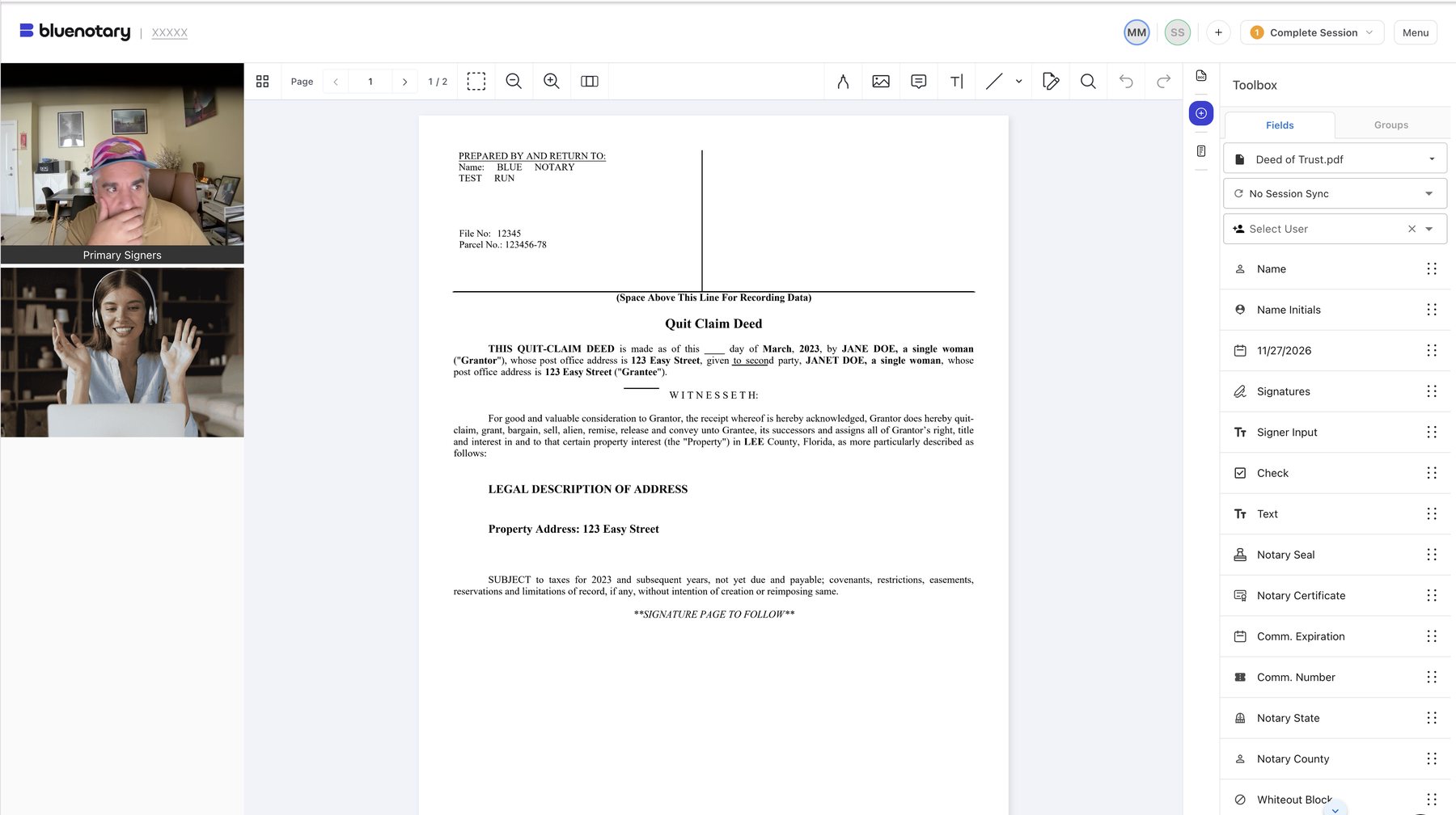
The BlueNotary signing room: you and the notary on camera (left), your document center screen, and the drag-and-drop toolbox (right).
Have this ready
- A free hand to sign: mouse, finger, or stylus all work
- Content questions settled beforehand. I notarize the signature; your attorney or the receiving party advises on content
- Ten to fifteen quiet minutes
Identity requirements reflect Florida's remote online notarization statute (§ 117.265) and BlueNotary's current verification options; accepted foreign ID documents vary by country.